Managing your inbox
Last updated May 11, 2026
Your Bondr inbox shows all influencer email threads in one place — with campaign data right next to your conversations.
Quick tabs
Use the tabs at the top to quickly switch between views:
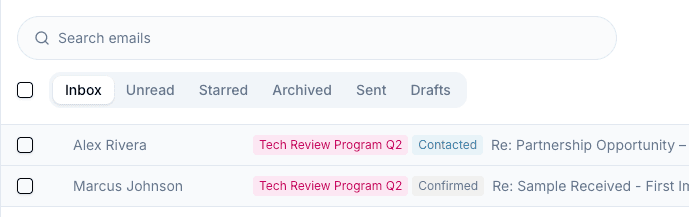
- All — Every thread in your inbox
- Unread — Threads with unread messages
- Starred — Threads you've starred for follow-up
- Archived — Threads you've archived
- Sent — Threads where you sent the last message
- Drafts — Threads with unsent draft emails
Search
Use the search bar to find threads by subject, sender, recipients, CC/BCC, and message snippets. Search results are ranked so the most relevant threads appear first.
Translation and AI explanation
Use the Translate button on an individual message when you need to read an email in another language. After translating, you can switch back with Show original.
When literal translation is not enough, use AI explanation to summarize the business context, key conditions, and points to confirm before replying. See Email translation and AI explanation for details.
Bulk actions
Select multiple threads with the checkboxes to perform bulk actions — archive, delete, mark as read/unread, or star.