How enrichment works
Last updated May 11, 2026
Enrichment lets you automatically fetch public profile data from Instagram, YouTube, and TikTok — and fill it directly into your campaign table.
How to use enrichment
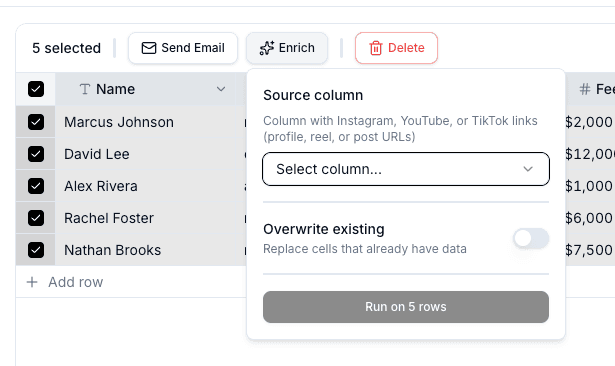
- Open a campaign and select the influencer rows you want to enrich
- Click the Enrich button in the selection toolbar
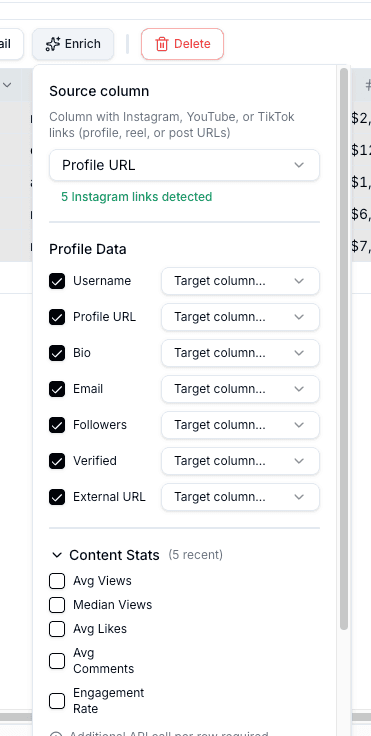
- Choose the source column containing social handles
- Select which data fields to fetch and map them to your campaign columns
- Click Start Enrichment
By default, Bondr does not overwrite cells that already have values. Turn on Overwrite existing data before starting enrichment if you want new profile data to replace existing values.
Review results and retry failures
After enrichment finishes, the completion banner above the campaign table shows how many rows succeeded, failed, or were skipped.
- Completed — Selected fields were saved to the destination columns
- Skipped — The destination cell already had a value and was left unchanged. Turn on Overwrite existing data and run enrichment again if you want to replace it
- Needs review — Bondr could not enrich the row because of an inaccessible profile, temporary error, unsupported link, or similar issue
Open View failed to see the row number, source value, error, and time for each failed record. If any failed records are retryable, use Retry failed to run only those records again.
Available data by platform
- Username, bio, email, external URL
- Follower count, verified status
- Average views, median views (from recent Reels)
- Average likes, average comments
- Engagement rate
YouTube
- Channel handle, description, email, country
- Subscriber count
- Average views, median views (from recent videos)
TikTok
- Username, bio, email, external URL
- Follower count, verified status
- Average views, median views (from recent videos, excluding pinned)
- Average likes, average comments
- Engagement rate
FAQ
Where does the email address come from?
Email addresses are extracted from publicly visible sources — Instagram bios, YouTube channel descriptions, or TikTok bios. If the influencer hasn't listed an email publicly, this field will be empty.
How is engagement rate calculated?
Engagement rate = (average likes + average comments) / followers × 100, based on the most recent content (up to 5 posts). YouTube does not include engagement rate — only view-based metrics are available.